

Managing employees in one location can already keep an HR team busy. Add another branch, another island, or another legal entity, and the work quickly becomes more complicated.
Employee records may sit in different spreadsheets. Attendance policies may vary between locations. Public holidays are not always the same. Payroll teams may follow different rules. Managers need access to their employees but should not see information from every branch. Leadership still wants one clear view of the entire workforce.
This is why growing companies are searching for HR software Caribbean businesses can use to manage employees across locations without losing control of local processes.
The goal is not simply to put every employee into one database. Companies need technology that can centralize workforce information while supporting location-specific payroll configurations, attendance rules, leave policies, approvals, documents, security permissions, and reports.
So, what should Caribbean businesses look for when managing a workforce across multiple locations?
Why Is Managing Employees Across Caribbean Locations So Complicated?
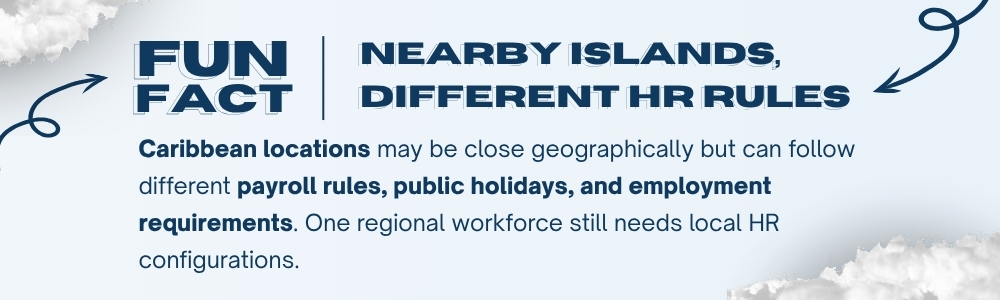
The Caribbean is a region, not a single employment market.
A company may have employees in the Cayman Islands, Jamaica, Barbados, Bermuda, the British Virgin Islands, or other Caribbean jurisdictions. Even when employees work for the same business group, local requirements and operating practices may differ.
HR teams may need to manage:
- Different public holiday calendars
- Location-specific leave policies
- Different working hours and shift structures
- Local payroll configurations
- Statutory deductions and contributions
- Multiple currencies
- Separate legal entities
- Different approval hierarchies
- Employee documents and expiry dates
- Location-based reporting requirements
The challenge becomes greater when every branch manages these processes differently.
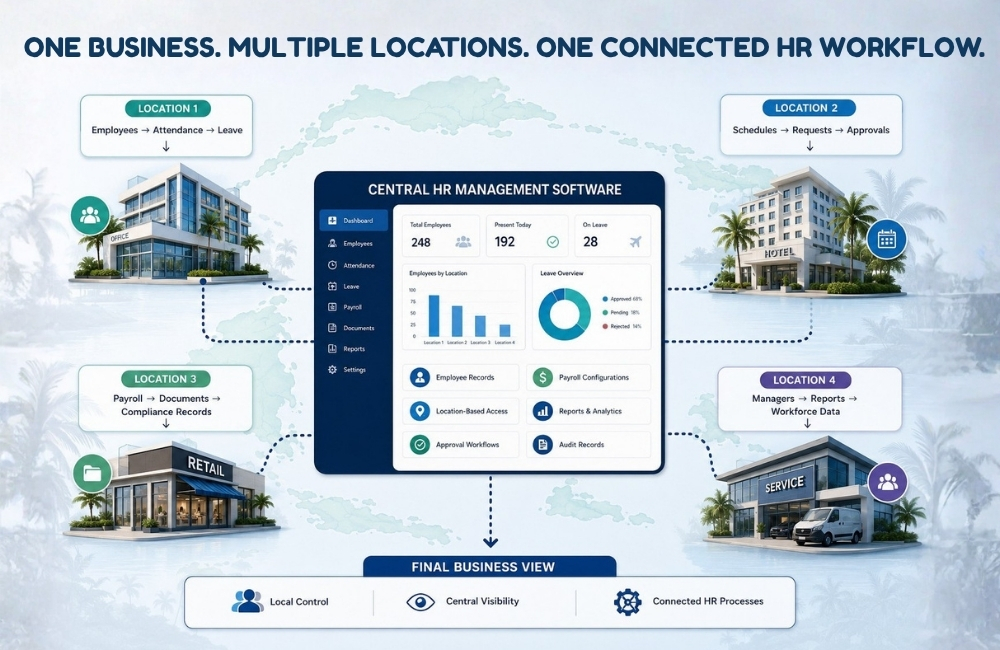
A multi-location HR software system can help businesses maintain a common HR structure while allowing locations to follow the rules and configurations that apply to them.
Without that balance, companies usually face one of two problems: too much central control that ignores local requirements, or too many disconnected processes that make group-level reporting difficult.
What Goes Wrong When Using HR software for Multiple Locations ?
Imagine a Caribbean business operating five locations.
One branch manages leave requests by email. Another uses paper forms. A third maintains a spreadsheet. Two locations use separate software.
At the end of the month, leadership asks a simple question:
How many employees were absent from the company?
HR now needs to collect information from five sources, check different formats, remove duplicate records, and confirm whether each location calculated attendance in the same way.
The same problem can happen with payroll, employee documents, overtime, recruitment, and workforce reports.
Common issues include:
- Duplicate employee records
- Different versions of the same HR report
- Delayed approvals between locations
- Inconsistent employee data
- Limited visibility for leadership
- Manual consolidation of reports
- Difficult access control
More time spent checking payroll inputs
This is why companies often consider HR software for multiple locations when their existing processes become difficult to coordinate.
The software should help locations work together without forcing every branch to ignore its local requirements, while reducing HR process gaps across the employee lifecycle.
What Should Multi-Location HR Software Centralize?
Not everything needs to be managed identically.
But some information should be easy to access from one system.
A centralized HRMS can provide a common source for core workforce information while allowing businesses to control what users can see and manage.
Employee Information: HR teams should be able to maintain employee profiles, employment details, reporting relationships, job information, documents, and other important records. Authorized users should see the information relevant to their role and location.
Attendance and Working Hours: Different locations may have different shifts, schedules, weekly offs, overtime rules, or attendance management problems that become harder to identify when workforce data is managed separately. Good multi-location HR software should allow companies to configure these differences without maintaining separate attendance systems.
Leave Management: Leave policies, balances, holiday calendars, approval of workflows, and employee eligibility may differ across locations. A common system can provide central visibility while maintaining location-specific configurations.
Payroll Information: Payroll is one of the most sensitive parts of multi-location workforce management. Businesses need payroll software Caribbean operations can configure according to the requirements of each jurisdiction, legal entity, and pay group.
The same company may need different deductions, contribution rules, payroll calendars, salary components, and reports across its locations.
Employee Documents: Contracts, work permits, identification records, policies, certifications, and other employee documents should be stored securely and made available only to authorized users. A centralized system can reduce the need to search across shared drives, inboxes, and branch folders.
How Can a Centralized HRMS Improve Workforce Visibility?
Leadership needs a broader view of the workforce. Local HR teams need detailed information about their employees.
Managers need access to their teams. Employees need access to their own records and requests. A centralized HRMS can support these different levels of visibility through role-based and location-based access.
For example:
Employees access their personal information, requests, pay slips, and documents.
Managers access employees within their assigned teams or locations.
Local HR teams manage the workforce records they are responsible for.
Payroll users access payroll information according to assigned permissions.
Group HR leaders review workforce reports across authorized entities.
Administrators manage system configurations and user access.
The goal is not to give everyone access to everything.
The goal is to give the right people access to the right information.
This makes security an important consideration when evaluating HR software for multiple locations.
How Do Approval Workflows Work Across Different Branches?
Multi-location companies often have more complicated approval structures.
An employee may report to a local manager.
Certain requests may also need approval from regional HR.
High-value requests may require senior management.
Payroll changes may need a separate review.
Without a structured system, approvals can quickly turn into long email chains.
A multi-location HR software platform can help businesses configure workflows based on factors such as:
- Location
- Department
- Employee level
- Request type
- Reporting manager
- Approval amount
- Legal entity
Notifications can inform approvers when action is required. Delegation can help requests continue when an approver is unavailable. Escalation rules can help identify requests that remain pending for too long.
This gives businesses a clearer way to manage approvals across locations without making HR teams manually coordinate every step.
How Does HR Software Caribbean Help Businesses?
HR Compliance becomes more difficult when companies operate in multiple jurisdictions.
Payroll requirements can change. Employee documents may expire. Work permits need monitoring. Access to sensitive information must be controlled. Businesses may need records showing who changed employee or payroll information.
Good HR compliance software can support businesses by helping them maintain:
- Employee and employment records
- Payroll configuration records
- Document expiry information
- User permissions
- Approval histories
- Audit logs
- Reports
- Policy acknowledgements
- Immigration and work permit records
Software does not remove the responsibility to understand and follow local laws.
It can help businesses maintain clearer records and manage compliance-related processes more consistently.
For companies evaluating HR Software Caribbean providers, regional payroll and compliance capability should be reviewed carefully rather than treated as a simple checklist item.
Can Employees and Managers Access HR Services from Anywhere?
A workforce spread across different locations should not depend entirely on desktop access or visits to the HR department.
Employees may need to check payslips, submit leave requests, review attendance information, receive notifications, access documents, or check request status while away from the office.
Managers may need to review requests and pending actions while working from another branch or traveling.
A centralized HRMS with mobile access can help employees and managers stay connected with HR processes regardless of their assigned location.
For companies comparing HR software for multiple locations, mobile access should be evaluated alongside security, permissions, and user experience.
Before selecting HR Software Caribbean, businesses should look beyond the number of modules listed on the vendor website.
Ask practical questions:
- Can the system manage multiple companies, branches, and locations?
- Can each location have different attendance and leave configurations?
- Does the payroll software Caribbean capability support the jurisdictions where we operate?
- Can payroll configurations differ by legal entity or pay group?
- Does the system provide role-based and location-based access?
- Can workflows differ across departments and locations?
- Can employees access HR services through a mobile application?
- Are employee documents stored securely?
- Are important user actions available through audit logs?
- Can leadership view consolidated reports?
- Does the HR compliance software support location-specific compliance processes?
- Can the system grow when the company enters another Caribbean market?
The answers can help businesses distinguish between a basic HR database and a platform that can support regional workforce operations.
Manage Every Location Without Losing the Bigger Picture
Expanding across branches, islands, and legal entities creates new opportunities.
It also creates more employee records, payroll configurations, approvals, documents, reports, and compliance responsibilities.
Separate systems may work for a while.
Spreadsheets may work until the workforce grows.
Manual consolidation may work until leadership needs faster answers.
A connected approach gives businesses more control over how workforce information is managed across locations.
HR HUB helps Caribbean businesses connect employee information, attendance, leave, payroll, workflows, documents, reporting, security, and compliance-related processes through one HR management platform.
Whether you manage employees across branches, islands, or multiple legal entities, HR HUB can help you maintain local configurations while gaining clearer workforce visibility.
Ready to simplify multi-location workforce management? Explore HR HUB and discover how HR software Caribbean businesses can use to manage people, payroll, and HR processes with greater clarity across every location.